

Subscriber Manager
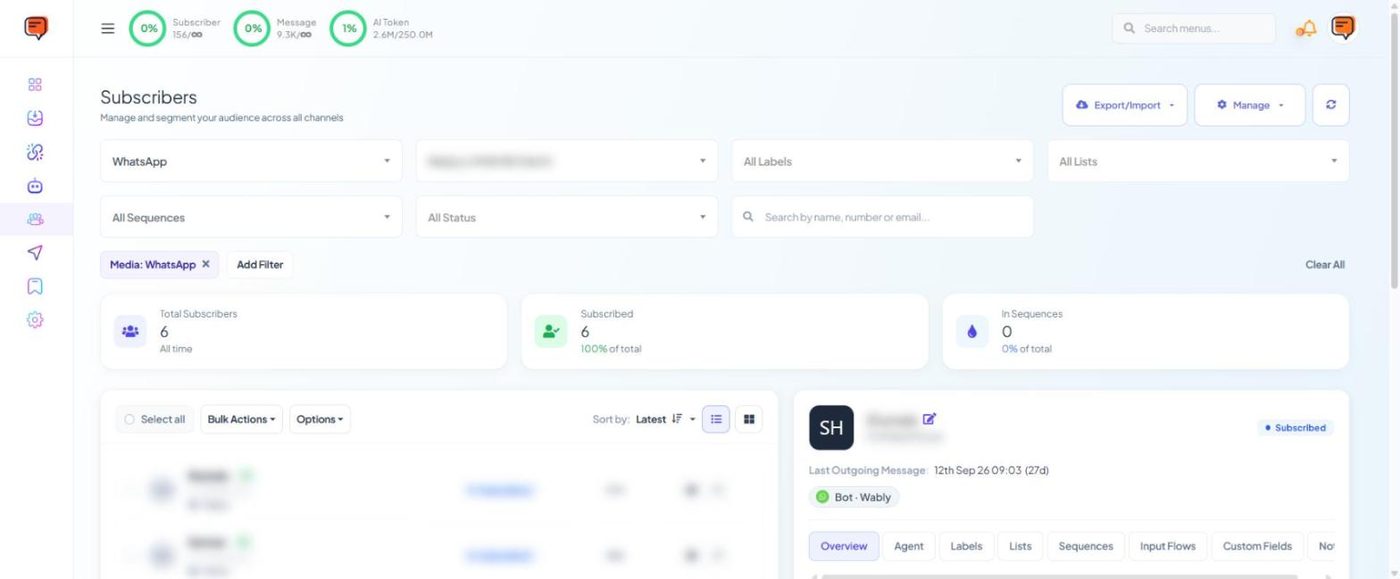
Where every contact lives — filter by channel, label, list, sequence and status, open a profile, and run bulk actions like Assign Label, Add to List or Assign Sequence.
A subscriber is anyone who has messaged one of your connected accounts, or whom you've added or imported. Subscriber Manager is your contact database across WhatsApp, Facebook, Instagram and Telegram.
Find people#
- Filters across the top: channel, bot/number, All Labels, All Lists, All Sequences, All Status, plus a search by name, number or email.
- Add Filter for more conditions; Clear All resets.
- Summary cards show Total Subscribers, Subscribed and In Sequences.
- Sort by latest and switch between list and grid view.
The profile panel#
Click a subscriber to open their profile on the right. Tabs: Overview, Agent, Labels, Lists, Sequences, Input Flows, Custom Fields, Notes. Click Save Changes after editing.
Quick Actions in the profile: Unsubscribe, Reset User Input Flow, Reset Appointment, Clear Chat History, and switches for Bot Reply and AI Reply for that one contact.
Bulk actions#
Tick contacts (or Select all), then Bulk Actions: - Assign Label - Add to List / Remove from List - Assign Sequence
Buttons at the top right#
| Button | Options |
|---|---|
| Export/Import | Export all as CSV · Import from CSV · Add a Subscriber |
| Manage | Labels · Lists · Custom Fields |
Importing a contact does not give you permission to message them. Only import people who have agreed to hear from you on WhatsApp. See WhatsApp rules.