

Create Your Wably Account
Sign up for Wably, pick a plan, and learn the left-hand menu — Shared Inbox, Connect Account, Chatbot Manager, Subscriber Manager, Broadcasting and Control Panel.
Sign up#
- Go to app.wably.in and click Sign up.
- Enter your name, business email and a password, then confirm your email from the link we send you.
- Log in. You'll land on the Dashboard with a trial active so you can explore before paying.
Choose or upgrade a plan#
Click your profile picture (top right) → Renew / Upgrade. Plans differ in the number of subscribers, messages, AI tokens, team members and features such as catalog and AI. Higher limits apply as soon as you upgrade.
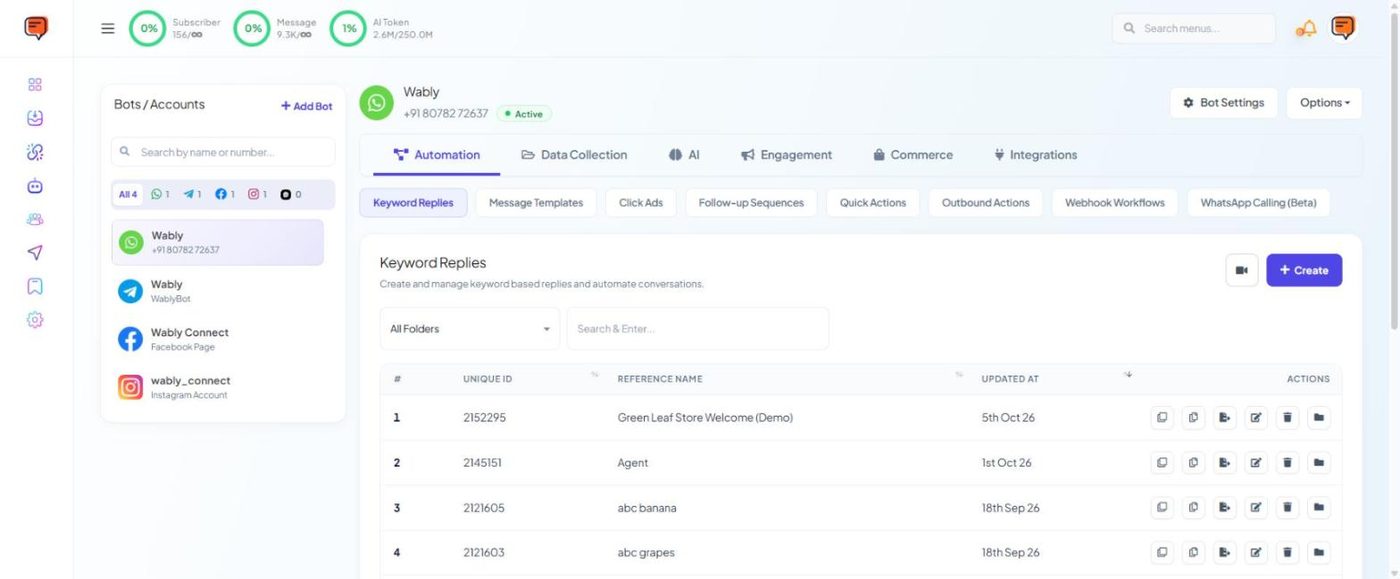
The three rings at the top of every page show how much of your plan you've used: Subscriber, Message and AI Token.
The left-hand menu#
| Menu | What it's for |
|---|---|
| Dashboard | Overview of your workspace |
| Shared Inbox | Live chats with customers across all your channels |
| Connect Account | Connect WhatsApp, Facebook, Instagram, Telegram, Webchat, Google, Shopify, WooCommerce and Salla |
| Chatbot Manager | Everything for one connected number: chatbots, templates, sequences, forms, AI agents, chat widget, store automation and Bot Settings |
| Subscriber Manager | All your contacts, labels, lists and custom fields |
| Broadcasting | The Broadcast Center for WhatsApp, SMS, Facebook and Telegram campaigns |
| Social Posting | Schedule posts to your connected social pages |
| Control Panel | User Manager, User Permission (roles) and Billing |
Your profile menu (top right) holds Account, Billing, Security, Renew / Upgrade, Support Ticket, API Developer and Logout.
How Chatbot Manager is laid out#
Most of your daily work happens in Chatbot Manager. Pick a number or account in the Bots / Accounts list on the left, then use the tabs along the top:
| Tab | Sub-pages |
|---|---|
| Automation | Keyword Replies, Message Templates, Click Ads, Follow-up Sequences, Quick Actions, Outbound Actions, Webhook Workflows, WhatsApp Calling (Beta) |
| Data Collection | User Input Flows, WhatsApp Flows, Appointment Booking |
| AI | AI Configuration, Agents |
| Engagement | Chat Entry (Chat Widget) |
| Commerce | Store Automation, Product Catalog |
| Integrations | HTTP API, Google Sheets, Autoresponder, Email, SMS |
The Bot Settings button sits at the top right of the same screen.
Next step#
Connect your WhatsApp number →